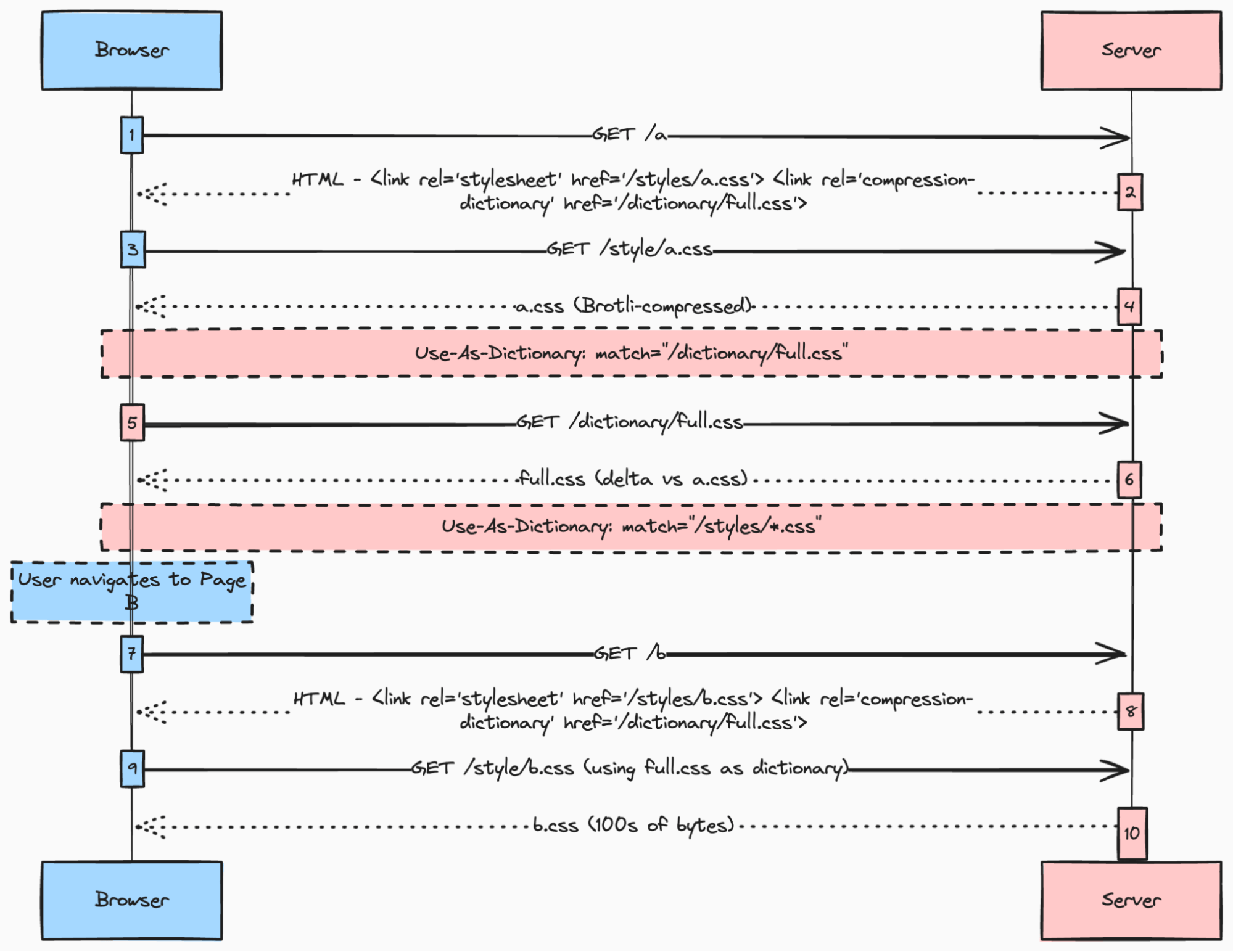
"Loading styles on the web is something that looks trivial at first. You just add a<link rel=stylesheet> to your page (or <style> for inline styles) and you're done. But if you wanted to load CSS fast, all of the sudden you run into trouble... Assuming you have a traditional web app (or what the kids call Multi-Page App/MPA), you now need to make tradeoffs:"
"You most probably want the CSS that's critical to the page the user is loading to block the rendering of that page, to avoid FOUC. At the same time, you don't want to load all the styles any page on your site may need, as that would delay that critical first load (and your FCP and LCP metrics on that page)."
Loading styles on the web appears trivial but introduces significant performance tradeoffs for Multi-Page Apps. Critical CSS should block rendering to avoid FOUC, yet loading every stylesheet upfront delays the initial load and degrades FCP and LCP metrics. Serving only per-page critical CSS can prevent unnecessary full-style downloads but often duplicates overlapping shared styles across pages. The basic options are embedding critical inline styles per page or creating external per-page critical styles, versus loading the entire CSS up front. Each approach incurs duplication, overlap, or delayed rendering that negatively impacts performance.
Read at Web Performance Calendar
Unable to calculate read time
Collection
[
|
...
]