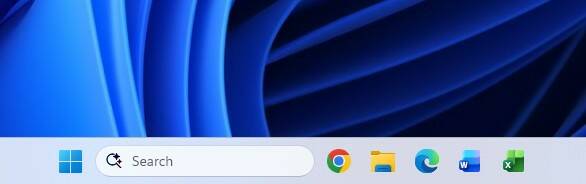
""The vision," Parakhin writes on X (formerly Twitter), "was to create symmetric panes: you have notification/system controls/etc. pane on the right, Weather/Widgets/News pane on the left. That pushed start menu into the center position. "If you have taskbar vertically, it starts conflicting with the panes... The taskbar in Windows 11 is located at the bottom of the screen. It cannot be moved or resized. It has also long been a bone of contention among many users of the operating system.""
""Parakhin writes, "Windows had it since 95, that's how I use it my whole life." It is possible to align the content of the taskbar to the left and also have it automatically disappear in Windows 11. However, moving the bar itself to the top, left, or right sides of the desktop is not supported. Parakhin famously made that "make Start menu great again" post at the beginning of 2024, although the current state of the enlarged user interface component is unlikely what users had in mind. Microsoft also relentlessly pushed advertising into Windows during Parakhin's tenure as CEO of Advertising and Web Services from 2022 to 2024.""
Windows 11's taskbar is fixed at the bottom and cannot be moved or resized. The design centers on symmetric panes with notification and system controls on the right and Weather/Widgets/News on the left, which pushed the Start menu into the center. Vertical taskbar placement conflicts with those panes, motivating the removal of relocation and resizing. Users who long relied on a movable taskbar have expressed discontent. It remains possible to align taskbar content to the left and enable auto-hide. Reports indicate Microsoft may consider restoring some customization options in the future.
Read at Theregister
Unable to calculate read time
Collection
[
|
...
]